Mechanical Keyboard Switches Explained: How They Work
Mechanical keyboard switches shape how every key feels, sounds, and responds. Compare switch types, specs, brands, and testing tools to find your fit.

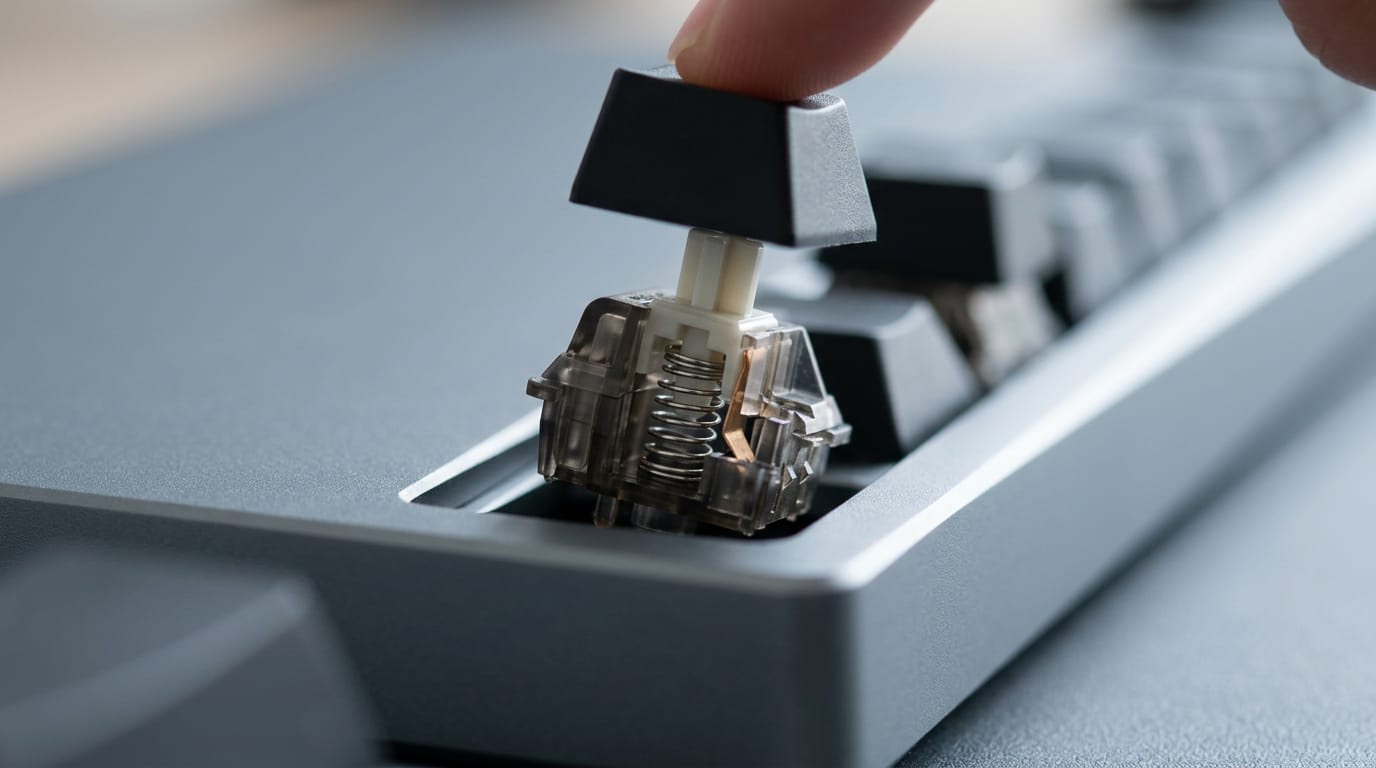
Mechanical keyboard switches are the mechanisms beneath the keys that determine how each press feels, sounds, and registers. Linear switches move smoothly, tactile switches add a felt bump, and clicky switches add an audible click; force, travel, materials, lubrication, and board compatibility also affect the experience. Choose for your typing, games, and noise level, check fit and specs, and try samples when possible, because the best switch is the one that feels comfortable to you.
Picking a keyboard is a lot like picking running shoes. Two pairs can look identical on the shelf, yet one feels springy on every step while the other leaves you sore by mile three. Mechanical keyboard switches work the same way.
A switch is the small mechanism under each key, and its type decides how every press feels, sounds, and responds.
This guide covers the main switch types, the specs and materials that matter, and how popular brands compare. You’ll also get a budget-friendly shortlist for Canadian gamers, plus hot-swap buying advice and the tools to test before you buy.
Core Mechanical Keyboard Switch Types
Ever wondered why two keyboards that look identical feel so different? The switch under each key decides it, and most switches fall into three core families.
Linear switches for smooth, fast presses
Linear switches give you a smooth, bump-free keystroke from start to finish. Nothing interrupts the press, so the key responds fast, and it’s often quieter than the alternatives because there’s no click mechanism.
Many linear switches also come pre-lubed from the factory, so that smooth feel is ready the moment you unbox the board.
Tactile switches give feedback without clicks
Tactile switches have a bump at the actuation point, the spot where the key registers your press. You feel that bump under your finger, so the feedback comes through touch rather than sound.
Bumps range from light to heavy, which makes tactile switches a go-to for typists who want clear feedback without the noise.
Clicky switches for a loud, crisp feel
Clicky switches pair an audible click with a bump, so you hear and feel every press. Kailh Blue and Kailh Box are common examples of the family.
That crisp response is why many typists love them, but the same sound makes them a poor fit for quiet spaces. Loud is the catch.
Consider a gamer who loves that sharp click but shares a thin-walled apartment. A clicky board carries through the wall at midnight, so they save it for daytime matches and reach for a linear board after dark.
Hybrid switches that mix two types
Hybrid switches blend traits from two families, so you don’t have to pick a pure type. You’ll find linear and tactile variants, which keep a mostly smooth stroke while adding a bump, and linear and clicky switches, which mix a smooth press with a click.
When you shop, use switch-type filters on store sites to narrow the list to the family you want, then compare prices.
How Switch Specs and Build Materials Matter
Two switches can look identical and still feel different under your fingers. Specs and materials explain why, and here’s what to look for.
Press force and travel distance explained
Actuation force is how much pressure it takes to register a keypress, measured in grams. Bottom-out force is what it takes to reach the base, where the key physically stops.
Pre-travel is how far the key moves before it registers, and total travel is the full distance to the base. Pre-travel shows when a key registers, while total travel shows how far it goes.
Materials used in housings and stems
The housing is the plastic shell around the switch, and the stem is the part your keycap sits on. Here’s what you’ll see on the spec sheet:
- Nylon and POM housings: nylon and POM (polyoxymethylene) are plastics used for the outer shell.
- Polycarbonate tops: polycarbonate is a plastic used for the top housing.
- UHMWPE and POM stems: UHMWPE (ultra-high-molecular-weight polyethylene) and POM are used for stems.
- Springs and pole length: the spring pushes the stem back up, and the pole is the center post it sits around. Pole length is one more spec to compare.
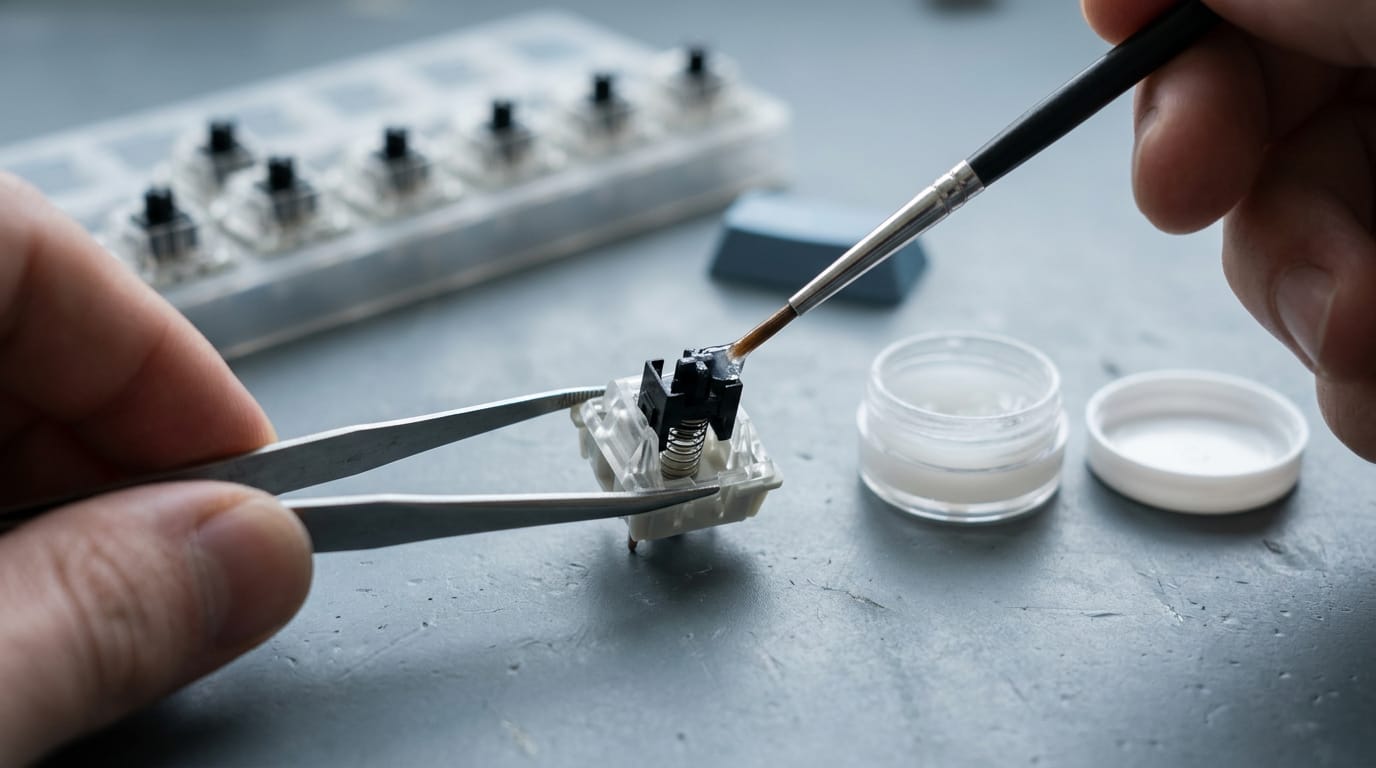
Why lube and factory tuning change feel
Lube affects how smoothly the stem slides inside the housing, which is part of why switches with the same specs can feel different.
- Pre-lubed switches have lube applied at the factory, while unlubricated switches don’t.
- Factory-lubed options arrive tuned, so you skip the work.
- Hand-lubed switches are lubed by you, which means more time but more control.
- Dry lube uses a dry film instead of a wet lubricant.
It’s a trade-off between convenience and control.
Checking mount type and compatibility
Before you buy, confirm the mount type, since a switch has to fit the board or plate it goes into.
- PCB mount: the pins solder directly onto the printed circuit board (PCB).
- Plate mount: the switch snaps into a plate that sits on top of the board.
- Keycap interference: some keycaps rub against neighboring switches, so check clearance before you order.
Say you’re a gamer swapping switches into a board you already own. A switch built for one mount style generally won’t fit the other, so a wrong guess means a return you didn’t need. Mount first. Keycaps second.
How the Main Switch Types Compare
Most switches fall into three families: linear, tactile, and clicky. Here’s what each one changes when you press a key.
Feel differences between each switch type
The three types differ in what you feel and hear on every press:
- Linear: smooth from top to bottom, with no bump.
- Tactile: a bump you feel when the key registers.
- Clicky: an audible click that adds sound to the feedback.
A tactile switch changes how a press feels, while a clicky one changes how it sounds.
Typing accuracy and fatigue can differ across the three, but an ergonomic assessment of mechanical keyboard switches notes that their combined effects on typing and muscle load remain unclear. Pick by feel first.
Are linear switches loud?
Usually not. Here’s how the three compare:
- Linear: quiet, which suits shared spaces.
- Tactile: moderate, a middle ground.
- Clicky: loud enough to carry across a room.
Consider a gamer sharing an apartment with a partner who sleeps early. A linear board keeps late-night sessions quiet enough that the partner can sleep through them.
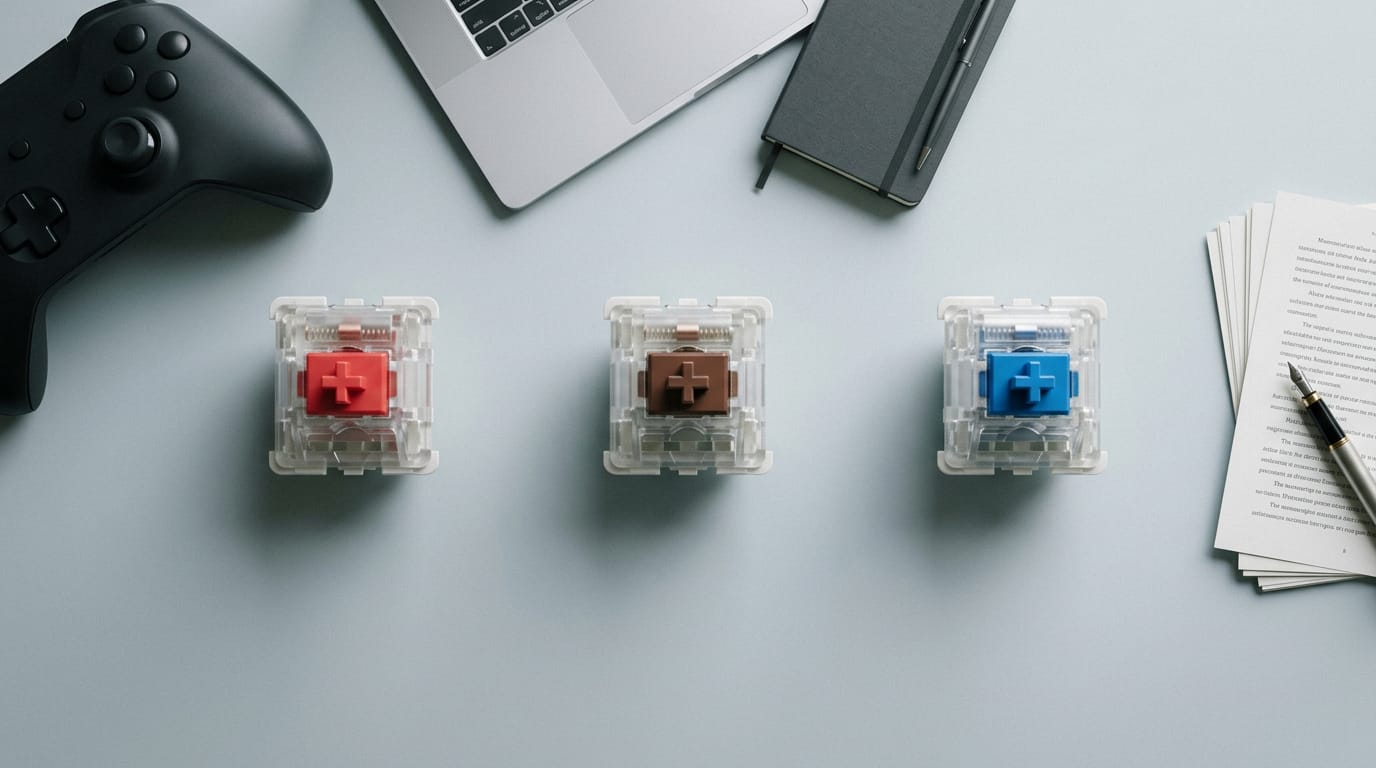
Which is better, blue, red or brown?
There’s no single winner, since each color suits a different job. Red is linear, brown is tactile, and blue is clicky. Here’s how they compare:
- Actuation force: the pressure needed before a key registers. It varies from switch to switch, so check the spec sheet rather than trusting the color alone.
- Noise level: red is quietest, brown is moderate, and blue is loudest.
- Pros and cons: red is smooth and quiet but offers no bump to confirm a press. Brown adds feedback without much noise, though the bump doesn’t suit everyone. Blue is satisfying to type on but loud.
- Typical applications: red suits gaming, brown suits a mix of typing and gaming, and blue suits heavy typing where you want audible feedback.
So which is better? If gaming is your main job, start with red or brown. If you mostly type, brown or blue will likely feel better.
Specialty Switches Beyond the Basics
Once you know the standard types, a few specialty families suit particular jobs. Here’s where we’d put each one.
Silent switches for quiet gaming and offices
Most switches clack on the way down and back up. Silencer stems add internal dampening to soften the bottom-out, the hard stop at the end of each press. Silent linear and silent tactile versions keep their feel but get quieter.
Think of a player with a partner who sleeps early. A silent linear board lets them grind ranked matches at midnight without waking the house. The same goes for a shared office. Quiet is the point.
Magnetic Hall effect switches for fast triggers
Hall effect switches track a magnet instead of closing metal contacts, so the board can read how far a key has moved. Wooting and Owlab both offer options in this category, and some makers sell dedicated magnetic collections.
For first-person shooter (FPS) players, the big draw is the rapid trigger. A standard switch waits for the key to fully rise before it resets. A rapid trigger resets as soon as the key starts to lift.
Picture a shooter player changing direction mid-fight: that next press can register sooner.
Gaming switches that actuate quickly
Actuation is the point where a switch registers your press, and fast actuation moves that point earlier in the key’s travel. Kailh Speed is one family you’ll often see here.
Gaming-focused linears are smooth switches sold for games, with no bump to break your rhythm. Optical switches take a different route, registering a press with a beam of light instead of metal contacts. So which is better? Neither wins outright.
It’s less about winning and more about fitting your desk, your budget, and your games.
Who Makes the Most Popular Switches
Here’s who makes the switches you’ll see most and how we’d sort them. Specifics vary by model, so check the spec sheet.
Big brands like Cherry, Gateron and Kailh
Cherry MX, Gateron, and Kailh are the big names in this space, and each sells many models. Use this quick check:
| What to compare | How to check it |
|---|---|
| Feel | Press a sample and judge how even it is |
| Price | Compare listings in Canadian dollars (CAD) |
| Durability | Find the rated lifespan on the spec sheet |
| Best for | Match the switch to your main games and typing |
How brands differ in feel and price
It’s less about the name on the box and more about how a switch feels under your fingers. Brands tune their switches differently, so two that look alike on paper can feel nothing alike.
Smoothness is part of that, so notice whether each press feels even. Press a sample first.
Brands also span budget to premium tiers, but a higher price doesn’t guarantee a better feel.
Dust-proofing means how well a switch keeps dust and debris out of its moving parts. Look for its rated lifespan and dust-proofing on the spec sheet, especially if your board sits where crumbs and pet hair collect.
Think of a builder who types through long workdays and games at night. They’ll pick a switch that’s comfortable for typing and still responds well in a fast match, so one board covers both.
Enthusiast and boutique brands to explore
Beyond the big names sit enthusiast brands, smaller makers hobbyists seek out for variety. Start with these:
- HMX, KTT, Durock
- Wuque Studio, JWK, Tecsee
- TTC, Keygeek, BSUN
- Owlab, Wooting, Haimu
Before you buy, read reviews and confirm the seller ships to Canada at a fair price.
Choosing a Switch for Your Use Case
Tools for Buying, Testing and Modding
First, check whether your board has hot-swap sockets (they let you change switches without soldering) or is soldered (each switch is fixed in place with solder). That decides which tools you need.
Test switches before you commit
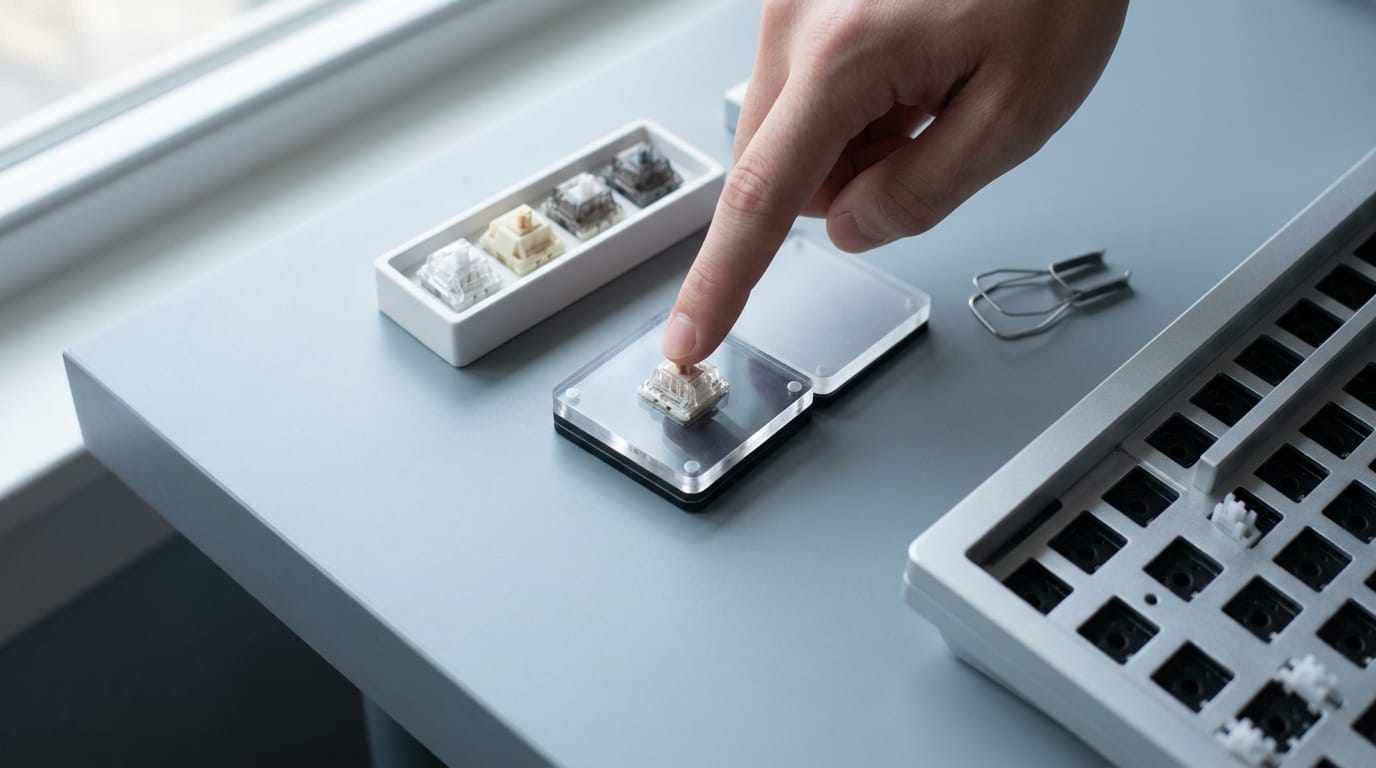
- Switch tester packs let you compare a range of switches side by side.
- Sample packs give you a few switches to try without buying a full set.
- Trying before buying means feeling a switch in your hand before you commit to a whole board.
Think of a gamer who wants a tactile switch but has never felt one. A sample pack lets them test a few and keep the one that feels right. Feel it first.
Pullers, openers and lube for modding
- Switch pullers remove switches without prying, which helps keep the pins straight.
- Switch openers split the housing so you can reach the parts inside.
- Springs and films change how a switch presses and tame stem wobble and spring noise.
- Switch lube smooths the moving parts, and small containers help you apply a thin coat.
If your board is hot-swap, a puller is the first tool worth buying. The rest can wait.
Pricing, price matching and authorized sellers
Compare per-switch pricing, not package prices, by dividing the total price by the switch count. Check totals in Canadian dollars (CAD) at each Canadian store, including taxes and shipping.
Read each store’s price-match policy first, since terms vary. Verify any authorized reseller claim before you pay.
Bulk quantity belongs in the comparison too. A study of business-to-business (B2B) pricing, The Influence of Purchase Batch on Wholesale Pricing Strategy Selection on B2B Platform, treats batch requirements as a factor in how prices get set.
What customer reviews reveal about switches
Scan reviews for these four things:
- Smoothness and sound. Check how the key travels and how loud it is.
- Bent pin complaints. Pins are the thin metal legs that seat a switch in the board, so bent-pin reports call for a gentle hand.
- Stem wobble and spring noise. Wobble is side-to-side play in the stem, and films can help with both.
- Keyboard build experiences. Note how easily the switches went in and whether the board was hot-swap.
Think of a builder who sees stem wobble in two reviews. They add films or skip that switch.
Reviews tell you what others noticed. Your own hands tell you what you’ll notice. Test first, buy second.
Answers to Common Beginner Questions
Most beginners ask the same few things before they buy: what the switch types are, how loud they get, and which one suits games. Here’s the short version.
Quick answers on types, sound and gaming
A mechanical switch is the part under each key that registers your press. You’ll meet three main types:
- Linear: a smooth press with no bump along the way.
- Tactile: a small bump you feel before the key registers.
- Clicky: a bump plus an audible click.
Linear vs tactile for typing
Tactile switches are the usual pick for typing, because that bump confirms the key has registered before you bottom out. Linear switches feel smoother, which many gamers prefer for fast, repeated presses.
Quietest switch and color
Linear switches sold as silent variants, with built-in dampening, are the quietest choice. Color is only a shortcut, since each brand assigns its own, so check the spec sheet for the actual type.
Best gaming switch
There’s no single best, so match the switch to how you use the board. Think of a player who spends most evenings in shooters but types chat messages between matches.
A linear board keeps quick movement taps smooth, so the keyboard fades into the background during play. Pick by feel rather than by the box. Try before you commit.
Most popular switch type
Linear and tactile are the two you’ll see most often on store shelves, with clicky as the more specialized third. Start your search there.
Mechanical switches really come down to one question: how does a key feel after hours of gaming or typing? Once you know whether you want smooth linear travel, tactile bumps, or clicky feedback, the specs and brands start to fall into place.
Match the switch to the games and writing you do, set a budget you can stick to, and test in person whenever you can. The best switch is the one you’ll still enjoy pressing a year from now.
References
- An sEMG-Based Ergonomic Assessment of Mechanical Keyboard Switches: User Experience, Typing Performance and Bilateral Forearm Muscle Activation — doi.org (2026)
- The effect of keyboard keyswitch make force on applied force and finger flexor muscle activity — pubmed.ncbi.nlm.nih.gov (1997)
- The Influence of Purchase batch on Wholesale Pricing Strategy Selection on B2B Platform — doi.org (2018)
Questions
What is better, optical or mechanical switches?
Neither optical nor mechanical switches are universally better; the right choice depends on feel, budget, and use. Optical switches register presses with a beam of light, while conventional mechanical switches use metal contacts, and both come in different styles.
What are the different mechanical keyboard switches?
The three main mechanical switch types are linear, tactile, and clicky. Linear switches press smoothly without a bump, tactile switches have a bump at the actuation point, and clicky switches add an audible click. Hybrid, silent, and magnetic Hall effect options are also available.
What are the best switches for a mechanical keyboard?
There is no single best switch for everyone. Linear switches are a common choice for gaming and smooth, quiet presses; tactile switches suit people who want feedback without a loud click; clicky switches suit typists who enjoy audible feedback. Try samples and choose by feel and sound.
Which is better, blue, red, or brown switches?
No color is best for everyone: red switches are linear and usually quiet, brown switches are tactile with moderate noise, and blue switches are clicky and loud. Red is a common gaming choice, brown works well for mixed typing and gaming, and blue often appeals to people who want audible typing feedback.
Which switches are good for a mechanical keyboard?
Linear, tactile, and clicky switches can all work well, depending on your preferences and setting. Choose linear for a smooth press, tactile for a noticeable bump without a loud click, or clicky for sound and tactile feedback; check the specific model's specifications and try it if possible.
Are linear switches loud?
Linear switches are usually quieter than tactile or clicky switches because they have no click mechanism. Their sound still varies by switch and keyboard, and silent linear models with dampening are quieter still.
Do pro gamers use linear or tactile?
Many competitive players favor linear switches for smooth, repeated presses, while some prefer tactile feedback. There is no single preference shared by all pro gamers, and Hall effect switches are another option for players seeking adjustable actuation or rapid trigger features.
Do gamers prefer membrane or mechanical?
Gamers often choose mechanical keyboards because they offer a wider range of switch feels and can provide clear, consistent feedback. Membrane keyboards can still be a good fit if you prefer their feel, lower cost, or quieter operation; the best choice depends on your preferences and budget.
Sources
- An sEMG-Based Ergonomic Assessment of Mechanical Keyboard Switches: User Experience, Typing Performance and Bilateral Forearm Muscle Activation, doi.org,
- The effect of keyboard keyswitch make force on applied force and finger flexor muscle activity, pubmed.ncbi.nlm.nih.gov,
- The Influence of Purchase batch on Wholesale Pricing Strategy Selection on B2B Platform, doi.org,
Free · The Build Sheet
The Build Sheet: three gaming PCs priced at Canadian stores